Site handoff
Documentation coverage
0% 0/9 areas
Fast field documentation for copper, fiber, Wi-Fi, patch panels, VLANs, switch ports, asset inventory, findings, racks, PoE, and client handoff.
T568A / T568B pinouts, lengths, and field termination reference.
→Map patch ports to rooms, devices, VLANs, and switch ports.
→Document VLANs, subnets, gateways, DHCP ranges, DNS, and SSIDs.
→Build the implementation sheet and sync it from Patch Panel.
→Plan OM3, OM4, and OS2 uplinks, optics, strands, and test status.
→Track AP placement, switch ports, VLANs, radios, channels, and PoE.
→Capture device identity, addressing, serials, locations, and operational status.
→Turn site data into prioritized findings, recommendations, ownership, and follow-up.
→Plan cable IDs, endpoints, footage, service loops, and patch ports.
→Build rack elevation, track free U space, and catch collisions.
→Plan powered devices and make sure the switch budget holds up.
→Generate clean cable and endpoint labels from the site plan.
→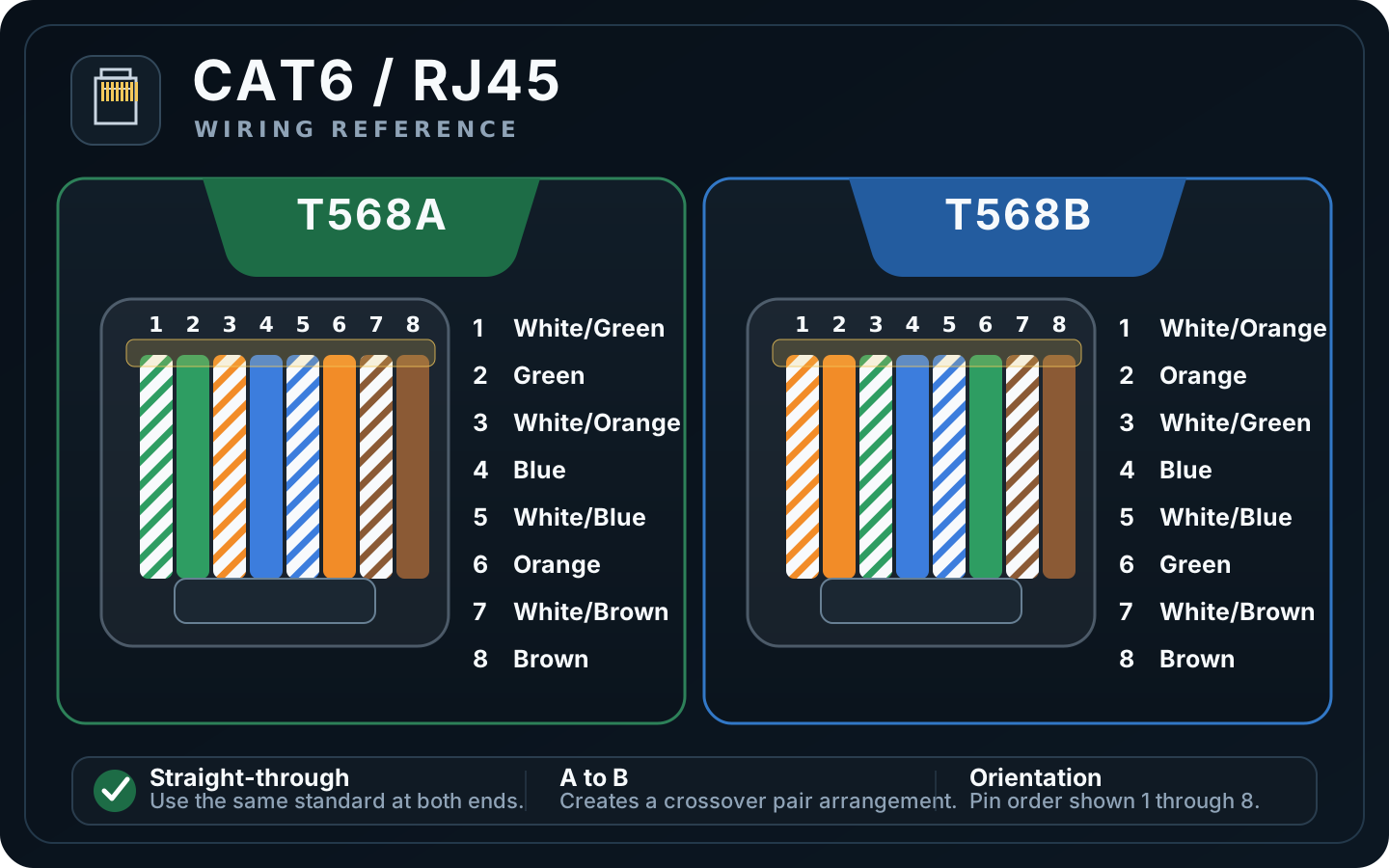
T568A vs T568B: Only the orange and green pairs swap positions. Blue and brown stay on the same pins.
Stay consistent: Use the same scheme at both ends unless you intentionally need a crossover cable.
Orientation: Pin order is shown 1 through 8. Always verify connector orientation and manufacturer markings before terminating.
Field practice: Preserve pair twist as close to the termination as practical and certify installed links when the project requires it.
| Port | Switch Port | Room / Jack | Device | VLAN | Status | Notes |
|---|
| VLAN | Name | Subnet | Gateway | DHCP Start | DHCP End | DNS | SSID | Purpose / Notes |
|---|
| Port | Description | Patch Port | Device | Native VLAN | Voice VLAN | Mode | PoE | Speed | Notes |
|---|
Common short backbone fiber. 10G SR planning reference: up to 300 m / 984 ft. Verify the actual optic and installed fiber.
Higher bandwidth multimode. 10G SR planning reference: up to 400 m / 1,312 ft. Good for many MDF to IDF uplinks.
Long-distance backbone fiber. 10G LR planning reference: up to 10 km. Always verify optic wavelength and vendor datasheet.
| Run ID | From | To | Fiber | Strands | Connector | Optic | Distance ft | Status | Planning check | Notes |
|---|
For common US planning, 20 MHz channels 1, 6, and 11 avoid overlap. Use Auto when you do not have a deliberate RF plan.
Plan channel reuse around AP placement and interference. DFS availability and channel rules vary by environment and regulatory domain.
Confirm client support, AP capability, and local regulatory requirements before relying on 6 GHz coverage.
| AP | Model | Location | Switch Port | Cable ID | Mgmt VLAN | SSIDs | 2.4 Ch | 5 Ch | 6 Ch | 5 GHz Width | PoE | Status | Notes |
|---|
Track the identifiers that matter during discovery, turnover, replacement, support, and warranty work. Inventory stays local to this browser and is included in Field Kit backup and reporting.
Sync pulls devices from rack equipment, Wi-Fi planning, and mapped patch-panel endpoints without duplicating existing synced rows.
| Device | Type | Manufacturer | Model | Serial | MAC | IP | VLAN | Location | Switch Port | Status | Notes |
|---|
Track what matters, why it matters, who owns the next step, and when it should be completed. Manual findings stay fully editable and are included in the Professional Report.
Field Kit can create findings from issues already documented in the workspace. Re-running the scan refreshes known findings and auto-resolves conditions that are no longer detected.
| Cable ID | From | To | Type | Est. ft | Loop % | Planned ft | Patch Port | Notes |
|---|
| Device | Qty | Watts each | Total | Notes |
|---|